
Part 2 – Choosing the Right Cutting Geometry for Every Material
Now that you understand cutting edges, flute direction, and helix angles from Part 1, let’s apply that knowledge of CNC router bits to real-world materials.
Every material cuts differently-wood tears, plastic melts, aluminum welds itself to tools, and foam rips apart if you move too slowly-so understanding these personalities upfront makes it much easier to choose the right cutting geometry for the job.
The key to good results is understanding how the tool’s geometry from Part 1 interacts with each type of material.
1. Cutting Tool Geometry for Wood (Best CNC Router Bits for Hardwood, Softwood & Plywood)
Wood has grain direction, density changes, moisture content, and natural fiber tension.
Best CNC Router Bits
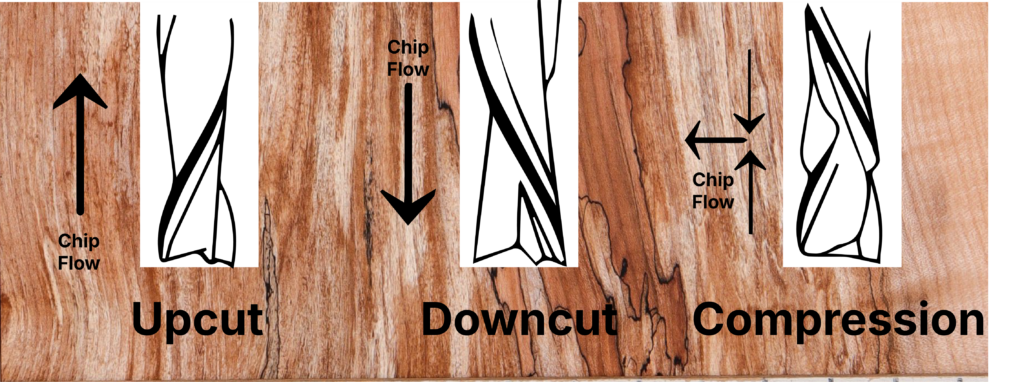
- 2-flute upcut → Great chip clearing, clean pockets (see upcut explanation in Part 1)
- 2-flute downcut → Crisp top edges, cleaner profiles
- Compression bit → Clean top and bottom edges on plywood (see compression definition)
- Ball nose → Smooth 3D shape cutting
Common Mistakes Explained
- Using one bit for roughing and finishing
A lot of beginners assume a single bit can do everything because the machine itself is precise. But bits are specialized tools. A roughing bit is designed to hog out material quickly-it has deeper flutes, stronger cutting edges, and geometry meant to take big bites. A finishing bit, on the other hand, has sharper edges and a smoother cutting geometry meant to leave crisp walls and cleaner surfaces. If you try to finish with a roughing bit, you’ll get chatter marks and fuzzy edges. If you try to rough with a finishing bit, you’ll dull it fast or even snap it. Using the right tool at the right stage is one of the easiest ways to instantly improve your results. - Running compression bits too shallow
Compression bits rely on both the upcut portion (at the tip) and the downcut portion (higher up the flute) working at the same time. If you only cut shallow passes-meaning you never reach the upcut zone-you’re basically using only the downcut section. That leads to poor chip evacuation and lots of heat. Worse, because the upcut isn’t engaged, the bottom edge of your plywood or sheet material will tear out. A compression bit needs enough depth to activate the dual‑direction cutting action. Shallow passes eliminate the entire reason the bit exists. - Burning edges with downcuts
Downcut bits push chips downward, which is fantastic for clean top edges but terrible for chip clearing. When chips get compressed at the bottom of the cut, they build heat quickly. Wood is especially sensitive to heat, so you’ll start to see scorch marks-dark brown or black streaks-along the cut lines. This isn’t because your feed rate is necessarily wrong; it’s because the chips physically can’t escape. The deeper the cut, the worse the issue becomes. If you see burn marks, it almost always means one of three things: (1) you’re using a downcut too deep, (2) your feed rate is too slow for that geometry, or (3) the bit is dull and rubbing instead of slicing.
Each of these mistakes ties directly back to the concepts explained in Part 1-chip flow, flute direction, and cutting edge behavior. When those aren’t aligned with your material and your cut type, problems stack up fast.
2. Cutting Tool Geometry for Plastics (Best CNC Router Bits for Acrylic, PVC & HDPE)
Plastics don’t behave like wood—they don’t tear, they melt. That means temperature control is everything, and geometry is the first line of defense. The wrong geometry traps heat, causes melting, leads to gummy buildup, and can even weld plastic to the bit.
Best CNC Router Bits
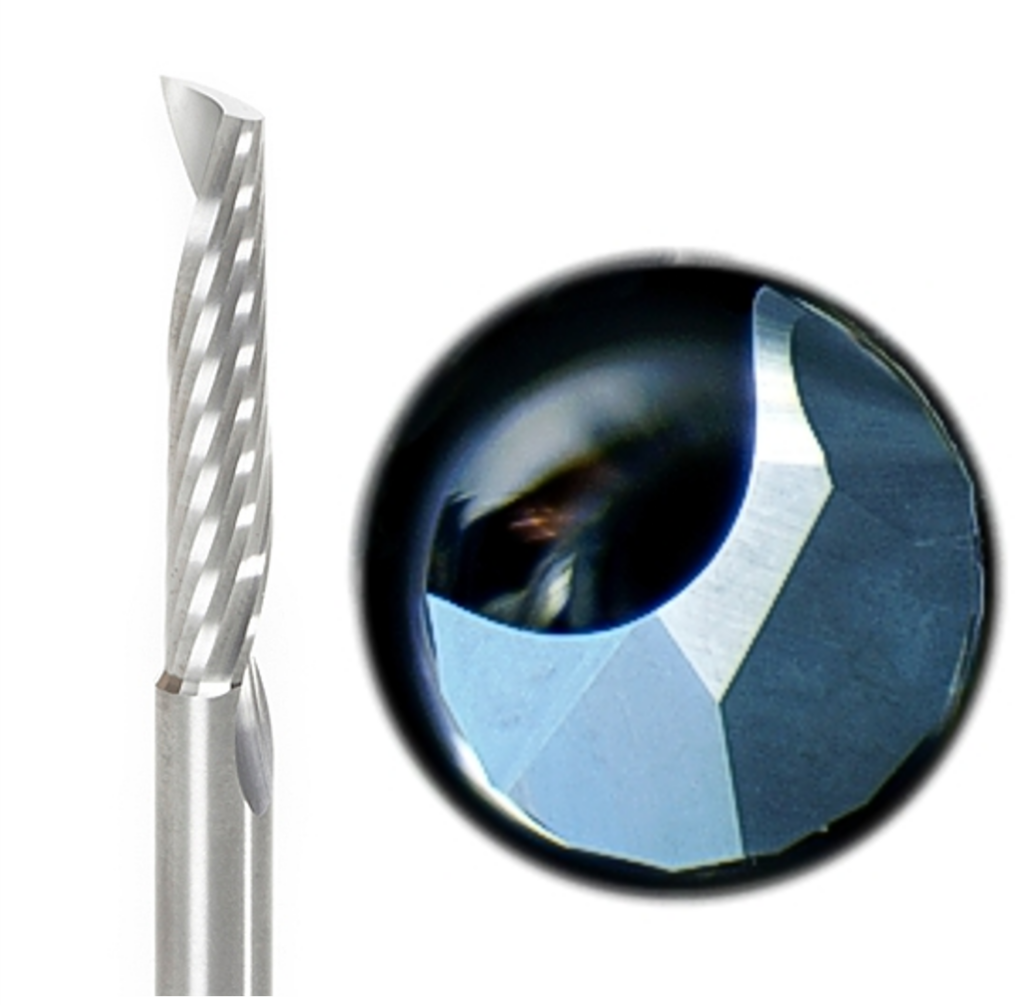
- Single‑flute upcut or O‑flute → Plastics produce long, stringy chips. A single flute gives those chips a wide path to escape, preventing heat buildup and keeping the cut cool and clean.
- Polished edges → Polished cutting edges glide through plastic instead of scraping it. Less friction means less heat, and that means fewer issues with melting.
- High rake angle tools → A high rake angle slices instead of smearing. Smearing makes heat; slicing keeps things cool.
Mistakes to Avoid
- Using multi‑flute bits → More flutes = less chip space. In plastics, this is a disaster. Chips pack, melt, and quickly weld to the tool, ruining edges and often ruining the workpiece.
3. Cutting Tool Geometry for Aluminum & Soft Metals (Beginner-Friendly CNC Metal Cutting Tips)
Aluminum is soft but sticky. Incorrect geometry causes “chip welding” where aluminum fuses onto the bit.
Best CNC Router Bits
- Single-flute carbide upcut → Strong chip evacuation
- Low-helix bits → Reduce chatter and heat
- Aggressive rake → Slices clean instead of rubbing
What Not to Do
- Never use woodworking CNC Router bits
- Avoid steel tools (they dull instantly)
- Don’t cut too fast or with too many flutes
4. Foam and Composites (CNC Bits for EPS, XPS, Foam Board, and Composite Panels)
Foam cuts easily but tears if the geometry or feed rate is wrong.
Best CNC Router Bits
- Straight flute → Prevents fiber lifting
- Downcut → Helps with surface skins
- Ball nose → Excellent for sculpting or 3D shapes
Key Insight
Foam likes fast feeds. Slow cutting tears instead of slices
Part 2 Summary
Every material has a “personality,” and choosing the right CNC router bits for a given material based on tool geometry is the difference between fighting your CNC and enjoying the process.
What’s Coming in Part 3
Part 3 pulls everything together and shows you how tool geometry doesn’t just affect the shape of the cut, but the entire behavior of the machine-how fast you can push the tool, how deep you can cut, how heavy the chips should be, and even how smooth or noisy your CNC sounds. It’s where we finally connect the dots between the CNC router bits you choose and the performance you get, so you can stop guessing and start dialing in your feeds, speeds, chipload, and finish quality with confidence.
Part 3
APA 7th Bibliography for Part 2
(These are the correct sources for material-specific machining guidance.)
Amana Tool. (n.d.). CNC router bit selection guide. https://www.amanatool.com/articles
CNCCookbook. (n.d.). CNC router tooling basics. https://www.cnccookbook.com/cnc-router-tooling-basics/
Harvey Performance Company. (n.d.). Machining material-specific tooling resources. https://www.harveyperformance.com/resources/
LMT Onsrud. (n.d.). Material and tool selection guides. https://www.onsrud.com
Kennametal. (n.d.). Machining aluminum and non-ferrous materials. https://www.kennametal.com
Whiteside Machine Company. (n.d.). Router bit information. https://whitesiderouterbits.com/pages/router-bit-info