

This beginner CNC woodworking guide is for the person who knows CNC woodworking is powerful, but…
hasn’t quite wrapped their head around why some cuts come out clean and confident, while others feel unpredictable. If you’ve ever stood in front of a machine thinking, “I get the idea, but I don’t fully trust this yet,” you’re exactly who this was written for.
CNC woodworking isn’t hard in the way people expect. It’s not about memorizing menus or chasing magic settings. What makes it feel difficult early on is that it exposes gaps in understanding very quickly. The machine does exactly what you tell it to do — no more, no less — and that honesty can be uncomfortable at first. Whether you’re considering your first machine, perhaps one of the CNC Machines Under $40K, or you’ve just unboxed a new one, this guide is for you. We even have a guide on Why Your 2nd CNC Should Be Your 1st to help you make the right choice from the start.
The goal of this CNC woodworking guide is simple: give you a solid mental foundation so CNC woodworking starts making sense as a system, not a guessing game.
What CNC Woodworking Really Is (and Why That Matters)
At its core, CNC woodworking is controlled motion applied to material through a cutting tool. That’s it. The machine doesn’t know what wood is. It doesn’t know grain direction, hardness, or whether you care about surface finish. It understands motion, speed, and force — and it executes those instructions consistently.
That consistency is both the biggest advantage and the biggest trap for beginners.
With hand tools or handheld routers, your body constantly adjusts without you thinking about it. You feel resistance. You hear changes. You slow down or back off instinctively. A CNC won’t do that. If something is wrong, it will keep going until you stop it or something fails. For a deeper dive into these issues, check out our blog on CNC Cutting Problems: Why Your CNC Cuts Burn, Chatter, or Tear Out (And How to Fix Each One).
Once you understand that difference, a lot of early frustration disappears. Problems stop feeling random and start looking mechanical — because they are. This is a core lesson in this CNC woodworking guide.
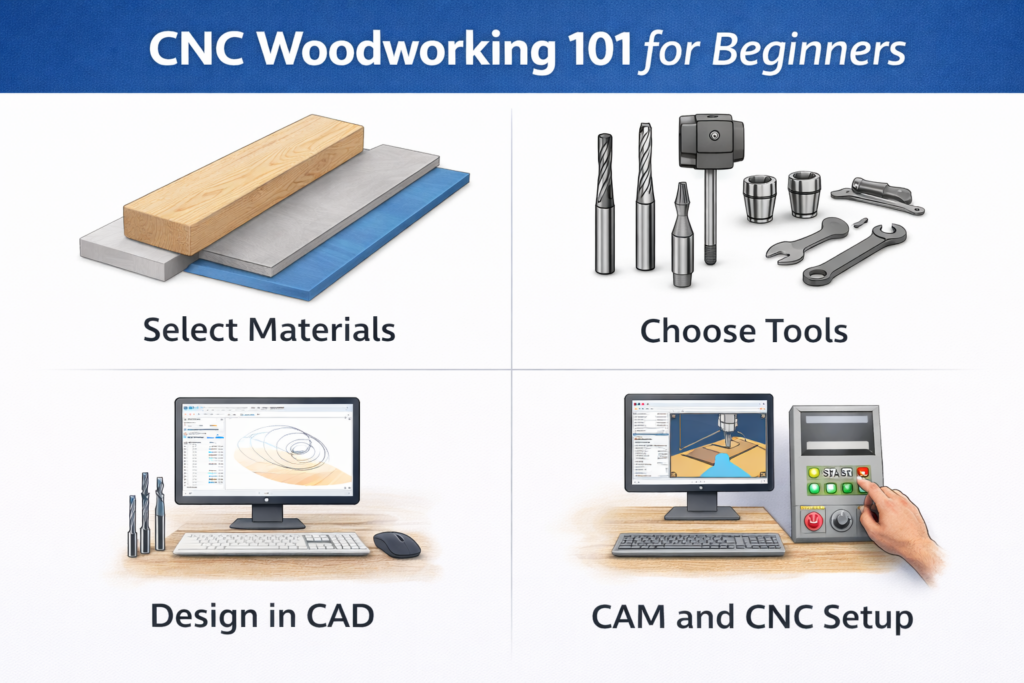
The Core Components Every Beginner Needs to Understand
You don’t need to be an engineer to run a CNC, but you do need to understand how the main pieces interact. CNC woodworking problems rarely live in just one place.
The Machine and Motion System: The frame, linear rails, ball screws or belts, and motors all exist to do one thing: position a cutting tool accurately and repeatably. Rigidity matters here. Slop, flex, or vibration show up directly in the cut.
The Spindle (or Router): This is where cutting force comes from. Speed control, bearing quality, and consistency matter far more than raw power for most woodworking operations. Heat, noise, and finish quality are all tied to how well the spindle is matched to the job.
Tooling: Cutters are where most beginners get tripped up. Geometry determines chip evacuation, surface finish, and heat buildup. Many cut-quality issues blamed on feeds and speeds actually start with the wrong tool choice. For a comprehensive look at why your tool selection is so important, read The Complete Beginner’s Guide to CNC Cutting Tool Geometry: Why Your Tools Matter More Than You Think.
Workholding: If the material moves, accuracy is gone — instantly. Vacuum tables, T-slots, fixtures, and clamps all work, but only when matched to the forces involved in the cut. Secure material equals predictable results.
CAM Software: CAM is the bridge between an idea and machine motion. Toolpaths aren’t magic; they’re decisions. Depth of cut, stepover, entry moves, finishing passes — all of these choices affect how the machine behaves.
When beginners struggle, it’s rarely because one of these components is “bad.” A good CNC woodworking guide explains that it’s usually because they’re not working together yet. This CNC woodworking guide will help you connect the dots.
Materials: Why Wood Isn’t “Just Wood” on a CNC
Material choice changes everything in CNC woodworking, especially early on. The key is understanding grain direction and how different species behave under cutting forces. Choosing the right bits is also critical, as we cover in our guide to CNC Cutting Tool Geometry for Materials.
Solid Wood: Behaves differently depending on species, grain direction, and moisture content.
Plywood and Sheet Goods: More stable, but thickness variation is common and catches beginners off guard.
Plastics and Foam: Cut beautifully but require different feeds, speeds, and chip evacuation strategies.
The key takeaway for any beginner reading a CNC woodworking guide is this: material behavior matters as much as machine setup. Many cutting problems aren’t machine problems at all — they’re material assumptions that don’t hold up under CNC motion.
Let’s Make Something: A Simple Cutting Board Project
Theory is great, but nothing builds confidence like making something. This is the most practical part of our beginner CNC woodworking guide. Let’s walk through a simple cutting board project. This is a perfect first project for any beginner following this CNC woodworking guide.
Step 1: Design Phase
Whether you’re using Fusion 360, VCarve, or EnRoute, the process starts with a design. For our cutting board:
Overall dimensions: 12″ x 8″ x 0.75″
Material: Hard maple
Feature: Decorative walnut inlay strip
Step 2: Material Preparation
Stock Selection: Choose a piece of hard maple that’s slightly larger than your finished dimensions. For a 12″ x 8″ cutting board, start with a 13″ x 9″ piece.
Surface Preparation: Your stock should be flat and smooth. Any irregularities will show up in your finished piece. Use a planer or sander to ensure consistent thickness.
Workholding Setup: The vacuum table on your Fusion Pro CNC provides excellent holding power for flat stock. Ensure your material makes good contact across the entire surface.
Step 3: Tool Selection
Primary Cutting: A 1/4″ compression bit is perfect for the main cutting operations. Compression bits, which you can learn more about in our Upcut vs Downcut vs Compression Bits guide, pull chips down into the cut, preventing tearout on both the top and bottom surfaces.
Inlay Groove: A 1/8″ straight bit will create the groove for your walnut inlay strip.
Finishing: A 1/2″ surfacing bit will provide a smooth final surface.
Step 4: Programming Your Toolpaths (CAM)
CAM software is where CNC woodworking either starts to feel predictable or completely overwhelming. Defaults exist to help you get started, but they’re not guarantees. Every toolpath answers a few basic questions:
How much material is the tool cutting at once?
How is the tool entering and exiting the material?
Where is force being applied?
Understanding those answers — even at a basic level — changes how you approach every job. Instead of hoping a cut works, you start expecting it to work because the logic makes sense. For a more in-depth look at feeds and speeds, check out our Beginner’s Guide to CNC Cutting Tool Geometry.
For our cutting board, you’ll program a few simple toolpaths:
Roughing Pass: Remove the bulk of the material quickly with a larger tool taking deeper cuts.
Finishing Pass: Use a smaller tool with lighter cuts to achieve your final dimensions and surface finish.
Inlay Groove: Create the decorative groove with precise depth control.
Step 5: Running the Job
Pre-flight Check: Always simulate your toolpaths before cutting. Check for tool collisions, verify your work coordinates, and ensure your material is properly secured.
First Cut: Start with a conservative feed rate. You can always speed up once you see how the material behaves.
Monitor Progress: Stay with your machine during the entire cut. Watch for any signs of problems like excessive vibration, poor chip evacuation, or tool wear.
Process and Repeatability: The Real Goal for Beginners
One of the biggest mindset shifts for new CNC users is realizing that repeatability matters more than perfection early on.
If you can make the same part twice and have it come out the same way, you’re doing something right — even if it’s not perfect yet. Repeatability means your setup is stable, your workholding is solid, and your toolpaths make sense.
Chasing tight tolerances before you can trust your process usually leads to frustration. Build consistency first. Precision follows naturally. This is a recurring theme in any honest CNC woodworking guide.
Bringing It All Together
By this point, a pattern should be clear. CNC woodworking isn’t about tricks or shortcuts. It’s about habits, understanding, and decision-making. Almost every success or failure traces back to a small number of choices made early in the process. A complete CNC woodworking guide must emphasize this.
So instead of ending this beginner CNC woodworking guide with more theory, let’s distill it down.
Below is a concise recap — not new information, but a reminder of what actually matters in this beginner CNC woodworking guide.
The 7 Do’s and Don’ts That Make or Break Beginners – Beginner CNC Woodworking Guide
✅ The 7 Do’s That Set You Up for Success
Do focus on consistency before chasing tight tolerances. Repeatable results matter more than perfect numbers early on.
Do choose tooling intentionally, not by habit. Cutter geometry controls cut quality long before feeds and speeds do.
Do secure your material like the cut depends on it — because it does. Movement ruins accuracy instantly.
Do learn what your CAM toolpaths are actually doing. Understanding motion builds confidence and predictability.
Do start conservatively and adjust intentionally. Speed is earned through understanding, not guessed.
Do listen to the machine. Sound, chips, and finish quality tell the truth early.
Do treat CNC woodworking as a system, not a single tool. Every part of the process stacks.
❌ The 7 Don’ts That Quietly Break Beginners
Don’t treat a CNC like a smarter handheld router. It won’t compensate for bad assumptions.
Don’t trust CAM defaults blindly. They’re starting points, not guarantees.
Don’t slow feeds to fix burning without checking tooling first. Heat is often a symptom, not the root cause.
Don’t ignore material flatness or thickness variation. Especially with plywood and MDF.
Don’t jump into advanced techniques before mastering basics. Complexity exposes weak fundamentals.
Don’t chase speed before your process is solid. Faster mistakes are still mistakes.
Don’t assume problems are “just how CNC is.” Most issues have clear mechanical reasons.
As you get started, we highly recommend our 3-part series on cutting tool geometry to build a strong foundation:
Part 1: Mastering CNC Cutting Tool Geometry
Part 2: Avoid Common Tool Selection Mistakes
Part 3: Bring It Together with CNC Feeds and Speeds
Final File thoughts
CNC woodworking rewards understanding, not shortcuts. The machine amplifies whatever habits you bring to it — good or bad. When things go wrong, the answer is usually simpler than it feels and almost always rooted in fundamentals.
Use this beginner CNC woodworking guide as a reference, not a checklist. Revisit it when something doesn’t make sense. That’s how confidence is built — not all at once, but steadily, cut by cut. We hope this CNC woodworking guide helps you on your journey.
If you liked this beginner CNC woodworking guide, please leave us a comment and share it to help others.
Categories:
CNC Woodworking, Beginner CNC, CNC Guides, beginner CNC woodworking guide
Tags: CNC woodworking guide, beginner CNC woodworking guide, CNC woodworking, CNC machine for wood, CNC router woodworking, CNC tool selection, CNC CAM software, CNC feeds and speeds, CNC joinery, CNC inlays, professional CNC woodworking, beginner CNC
References:
[1] Vectric. (n.d.). VCarve Pro Software. Vectric. Retrieved from https://www.vectric.com/products/vcarve-pro
[2] Autodesk. (n.d.). Fusion 360 for Woodworking. Autodesk. Retrieved from https://www.autodesk.com/products/fusion-360/
[3] ThinkSAI. (n.d.). EnRoute CNC Software. ThinkSAI. Retrieved from https://thinksai.com/enroute/
[4] CNC Cookbook. (n.d.). CNC Machining for Woodworkers. CNC Cookbook. Retrieved from https://www.cnccookbook.com/cnc-for-woodworkers/