
Part 3 – How Tool Geometry Controls CNC Feeds and Speeds & Cut Quality (CNC Feeds & Speeds Explained)
Now that we have explored how individual geometries behave in Part 1 and how they interact with different materials in Part 2, it is time to talk about what most people think they should start with: CNC feeds and speeds, chip load, and cut strategy.
Most beginners try to fix their cuts by adjusting numbers on the screen. They bump RPM up. They lower the feed rate. They reduce the depth of cut. They try one of those random feed-and-speed charts floating around online. Fusion CNC Feeds and Speeds Calculator.
But here is the truth no chart will tell you:
CNC feeds and speeds are not universal. They are shaped entirely by geometry.
That means if the geometry changes, the math changes. The expectations change. The sound of the cut changes. And your results change. Changing your CNC feeds and speeds won’t necessarily help you if the geometry is wrong.
Let us pull all of this together so you understand not just what to set, but why it works.
Chip Load Is Geometry in Motion (Understanding CNC Chip Load for Beginners)
Chip load is not just a number. It is the physical size of each bite your tool takes.
And the tool’s geometry determines how big a bite it can handle.
Chip Load Formula:
Chip load = Feed Rate ÷ (RPM × Flutes)
Let us break this down in real world terms:
RPM (Revolutions Per Minute) describes how fast the spindle is spinning. Higher RPM results in smaller bites.
Feed Rate describes how fast the machine pushes the tool forward. Higher feed rates result in larger bites.
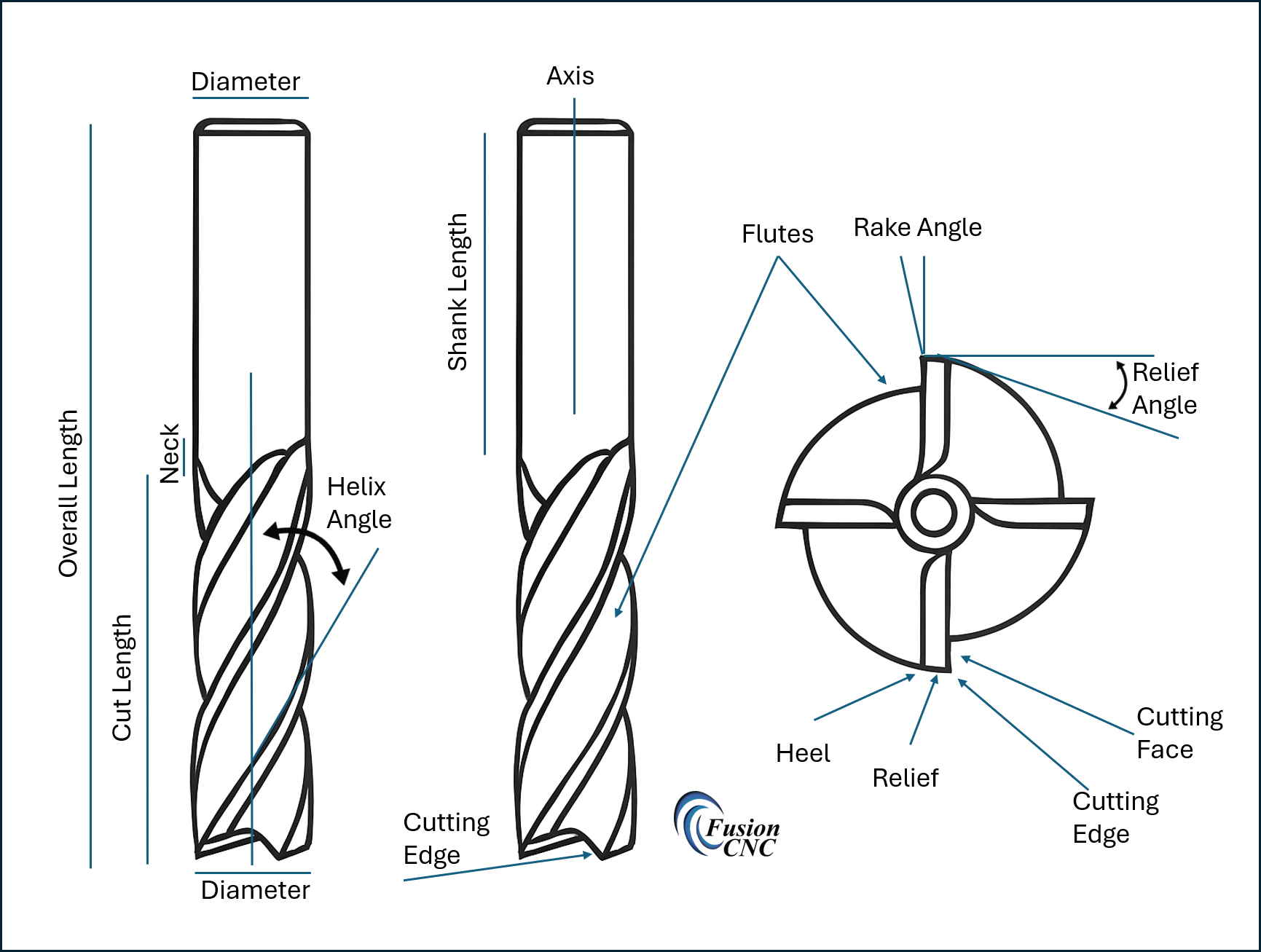
Flutes are the cutting edges. More flutes result in smaller chips and less chip space.
Geometry determines how aggressively the tool can cut before burning, chattering, or snapping.
Here is the part no one tells beginners:
If your geometry is wrong for the material, you cannot hit proper chip load no matter how hard you try.
For example, put a three flute bit in hardwood and run it at a spindle speed appropriate for wood.
Before you ever reach the chip load you should be cutting at, the bit will overheat, burn the wood, clog the flutes, and possibly snap.
Not because the numbers are wrong.
Because the geometry is wrong for the material.
That single insight changes everything.
Why Geometry Determines the Sound of a Cut
Every CNC user eventually learns that their ears can tell them almost as much as their eyes. A cut that is going well has a steady, confident sound as the tool moves through the material. You hear chips breaking cleanly and consistently, without sudden spikes in pitch or mechanical strain.
When geometry is wrong, the sound changes. Chatter usually means vibration caused by an insufficiently rigid tool or aggressive helix angle. Screeching means the edge is rubbing instead of slicing, often due to too many flutes, a dull tool, or poor chip evacuation. A rhythmic pulsing sound indicates uneven flute loading. A high pitched whine signals heat buildup from trapped chips.
What many people blame on the machine is almost always geometry. Flute count, helix angle, rake angle, core thickness, and chip evacuation determine the sound long before the finish reveals the problem.
How Geometry Dictates Depth of Cut for CNC Routers
Depth of cut is not about bravery or spindle horsepower. It is dictated by tool geometry.
Roughing tools are designed for deeper, more aggressive passes. Their wide flutes and thick cores allow them to remove large amounts of material efficiently. Running them too shallow can actually reduce performance.
Finishing tools are designed for precision. Their sharp edges and refined geometry excel at light passes. Push them too deep and they begin rubbing, heating up, and chattering.
Upcut bits handle deeper cuts well because they evacuate chips efficiently, but they require strong workholding due to upward pulling forces. Downcut bits excel at clean top edges but struggle with deep cuts because chips become trapped. Compression bits only work correctly when the cut is deep enough to engage both cutting zones.
Depth of cut is not guesswork. It is geometry expressed in motion.
Tool Deflection: The Silent Cut Killer
Tool deflection occurs when the cutting forces bend the tool during a cut. Even carbide tools flex under load. When a bit bends, accuracy disappears.
Deflection is caused by small core diameters, excessive tool stick out, too many flutes, aggressive helix angles, overly fast feed rates, and attempting deep passes with finishing tools.
Deflection shows up as tapered walls, oversized pockets, inconsistent depth, chatter marks, and premature tool wear.
Understanding geometry allows you to reduce deflection by selecting appropriate flute counts, core thickness, helix angles, and tool lengths.
How Geometry and Chip Load Affect Surface Finish
Surface finish is the direct result of cutting edge behavior, chip evacuation, and heat control.
Upcut bits produce clean bottom surfaces but often rough top edges. Downcut bits produce clean top edges but trap heat in deep cuts. Compression bits produce clean top and bottom edges when used at the correct depth. Ball nose bits produce smooth 3D contours but require small stepovers.
Helix angle also affects finish. High helix tools shear material smoothly but increase upward pull. Low helix tools provide stability in dense materials.
When the Machine Seems to Fight Back
Material lifting, vibration, drifting cuts, and unstable behavior are usually blamed on the machine. In reality, they are almost always caused by geometry.
Aggressive helix angles, excessive flute engagement, and poor chip evacuation create forces that overwhelm workholding and tool rigidity.
When geometry is chosen correctly, machines run smoother, cuts stabilize, and results become predictable.
Pulling It All Together: The Geometry, CNC Feeds, and Speeds Relationship
Geometry comes first. Chip load follows. CNC Feeds and speeds come last.
When geometry matches the material, chip load becomes achievable. When chip load is correct, CNC feeds and speeds fall into place naturally.
This is the point where CNC users stop guessing and start machining with confidence.
Part 3 Summary
Tool geometry influences every part of the cut. When you understand how geometry controls chip load, heat, sound, deflection, and surface finish, CNC routing becomes predictable and repeatable.
This is where beginners become confident operators.
However, for a baseline, you can check out our CNC Feeds and Speeds Calculator here. You have to start somewhere and this is a good place.
References
CNCCookbook. (n.d.). Feeds and speeds basics for CNC machining. https://www.cnccookbook.com/feeds-and-speeds/
Groover, M. P. (2010). Fundamentals of modern manufacturing: Materials, processes, and systems (5th ed.). Wiley.
Harvey Performance Company. (n.d.). Chip load, helix angle, and cutting tool fundamentals. https://www.harveyperformance.com/resources/
Kalpakjian, S., & Schmid, S. R. (2013). Manufacturing engineering and technology (7th ed.). Pearson.
Kennametal. (n.d.). Machining fundamentals and cutting tool engineering resources. https://www.kennametal.com/us/en/resources/engineering-resources.html
LMT Onsrud. (n.d.). Chip load recommendations. https://www.onsrud.com/Eng/Support/ChipLoads
Smid, P. (2008). CNC programming handbook (3rd ed.). Industrial Press.
Vectric Ltd. (n.d.). Tool database and feeds and speeds guidance. https://docs.vectric.com