
CNC Feeds and Speeds Explained: The 4 Variables That Really Control Every CNC Cut
CNC feeds and speeds are one of those topics that feel intimidating right up until the moment they finally click. And when they do click, it’s almost frustrating how simple the core idea actually is. Feeds, speeds, and chip load are only useful starting points after you have chosen the right bit and tool geometry. Once you have that foundation and a little real-world experience, you can adjust CNC feeds and speeds based on the sound of the cut, the surface finish you see, and the chips coming off the tool.
If you’ve spent any time around CNC machines, you’ve probably gone looking for CNC feeds and speeds charts, calculators, or formulas. Everyone does. We did too. You punch in numbers, hit cycle start, and then something still feels off. The cut burns. Or chatters. Or sounds like the machine is about to shake itself apart. I’ve been there and experienced all of it. At that point, it’s easy to think something is wrong with your machine, your alignment, or your setup, or that CNC feeds and speeds are some kind of dark art that takes years to understand.
They’re not.
Why CNC Feeds and Speeds Feel So Confusing at First
The problem is that CNC feeds and speeds are usually taught backwards. They’re presented as the starting point, when in reality they are the final adjustment. CNC feeds and speeds only make sense after four variables are already working together: tool geometry, material behavior, chip load, and cutting motion. Once you understand that relationship, everything changes.
For a long time, I thought you could pick up a bit and set the appropriate feed and speed based on a chip load value I found on a website. And sure, you can get lucky. I did many times. But there is a lot more going on beneath the surface than a single number in a chart.
CNC Feeds and Speeds Basics: What They Really Control
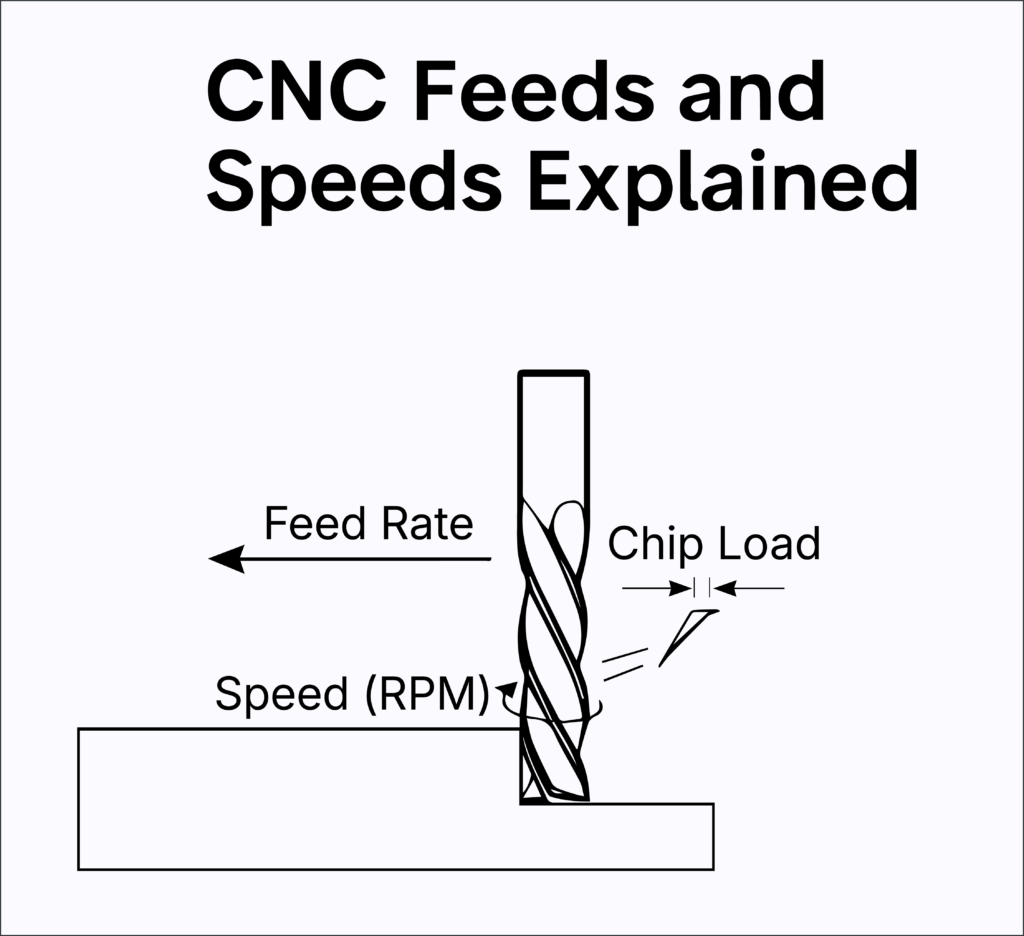
At the most basic level, CNC feeds and speeds are just motion. RPM is how fast the spindle spins. Feed rate is how fast the machine moves the tool through the material. Chip load is how much material each cutting edge removes per revolution. Tool geometry determines how that cutting edge engages the material in the first place. That’s it. No mystery.
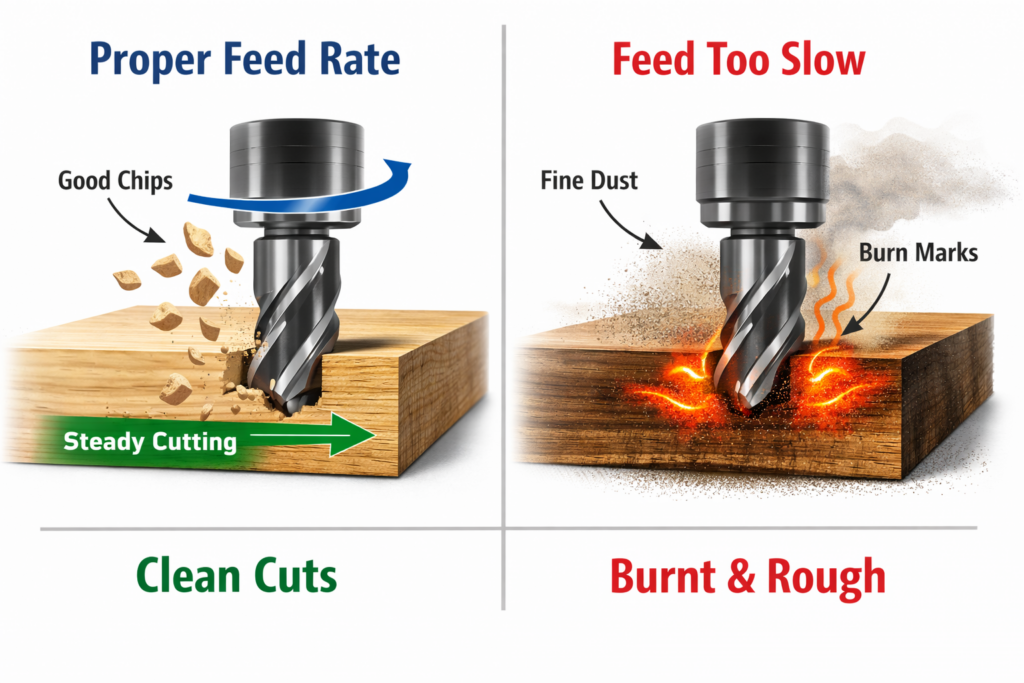
Chip load, in particular, is not theoretical. You can see it, hear it, feel it, and measure it. When CNC feeds and speeds are right, the machine sounds confident. Not aggressive. Not strained. Just steady. Chips come off cleanly instead of turning into dust. They’re warm, not scorching. The cut looks controlled and predictable.
When CNC feeds and speeds are wrong, the machine tells you immediately. You hear squealing. You see burn marks. The tool rubs instead of cutting. And here’s the part that surprises most beginners: slowing down often makes things worse. Too little chip load means friction instead of cutting. Friction creates heat, and heat destroys tools and surfaces.
Charts, Geometry, and Sound.
Most CNC feeds and speeds charts assume ideal conditions. Perfect geometry. Perfect chip evacuation. Perfect rigidity. Real shops don’t work that way. Real machines aren’t always perfectly rigid. Materials vary. Tool stick-out changes. That’s why copying CNC feeds and speeds blindly so often leads to frustration.
The right approach is to start with geometry. A single-flute upcut clears chips aggressively and can handle higher feed rates. A multi-flute tool limits chip space and demands different CNC feeds and speeds. A downcut traps chips, requiring lighter passes or excellent dust collection. A compression bit only behaves as intended when the cut is deep enough to engage both cutting zones. Once those decisions are right, CNC feeds and speeds stop feeling random and start behaving logically.
One more thing matters more than any chart: sound. A healthy CNC cut sounds almost boring. Smooth. Consistent. Calm. When CNC feeds and speeds are off, the machine complains. Learning to listen to the cut is one of the fastest ways to improve your results.
CNC feeds and speeds are not magic numbers. They’re the last step. When you treat them that way, machining becomes repeatable, reliable, and honestly a lot more enjoyable. The more you cut, the more you learn. As you gain experience, it all starts to make more and more sense.
References
Harvey Tool Company. (n.d.). Chip load: What it is and why it matters.
https://www.harveytool.com/resources/harvey-educational-resources/chip-load/
CNC Cookbook. (n.d.). Feeds and speeds: The ultimate guide.
https://www.cnccookbook.com/feeds-speeds/
Tormach. (n.d.). Understanding feeds and speeds.
https://tormach.com/articles/understanding-feeds-and-speeds.html
Autodesk. (n.d.). Feeds and speeds explained for CNC machining.
https://www.autodesk.com/products/fusion-360/blog/speeds-feeds-new-cnc-machinists/